JOREK Reader
This page explains how to use the JOREK GGD reader to visualize JOREK simulation data in Paraview.
Supported IDSs
Currently, the following IDSs are supported in the JOREK Reader.
mhdradiationplasma_profiles
Using the JOREK Reader
The JOREK Reader functions similarly to the GGD Reader, with the same interface and data loading workflow. This means that the steps for loading a dataset, selecting attributes, and interacting with the grid are identical. Refer to the GGD Reader for detailed instructions on:
Loading an URI: How to provide the file path or select a dataset.
Loading an IDS: How to load a dataset and display the grid.
Selecting GGD arrays: How to choose and visualize attributes.
Tuning the Bézier parameters
The JOREK Reader plugin has additional options to tune the Bézier interpolation. These options can be found on the bottom of the plugin window.

Tunable Bézier interpolation settings.
The following parameters can be tuned:
N plane- The number of toroidal planes to be generated.Phi range- The start and end angles of the phi plane in degrees.
For example, setting the Phi range from 0 to 270 degrees, and setting the number of toroidal planes to 20.
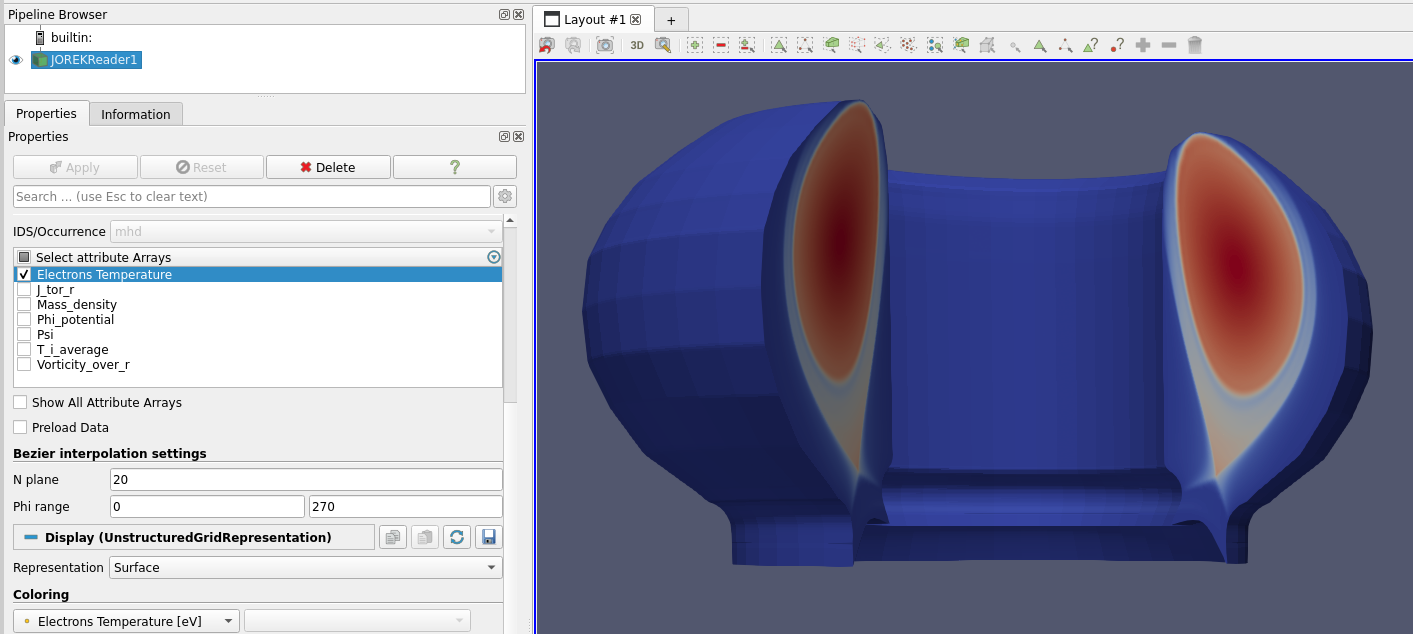
JOREK grid with phi in the range [0,270] and 20 toroidal planes.